Tree of Life Photo Tutorial: Follow the Screenshots
A visual reference to the upload, tree, positioning, effect, and download controls.
Quick answer
It takes five steps: upload your photo, choose one of four tree designs, position and resize it over the latch, pick an effect like Galaxy or Midnight, then download. Start to finish is under 60 seconds, with no app, account, or watermark.
Before you start: Have your breastfeeding photo ready. The best photos clearly show where baby latches, with some visible chest area for the tree roots and baby's head for the branches.
Upload Your Photo
The starting point for your keepsake
Head to our homepage and you'll see the upload area right away. You have two options:
- ✓Drag and drop your photo directly onto the upload area
- ✓Click "Upload Your Photo" to browse your camera roll or files
Tip: Works with JPG, PNG, GIF, and WebP. No size limits to worry about — we'll handle the rest.

Choose Your Tree Design
Four beautiful styles to pick from
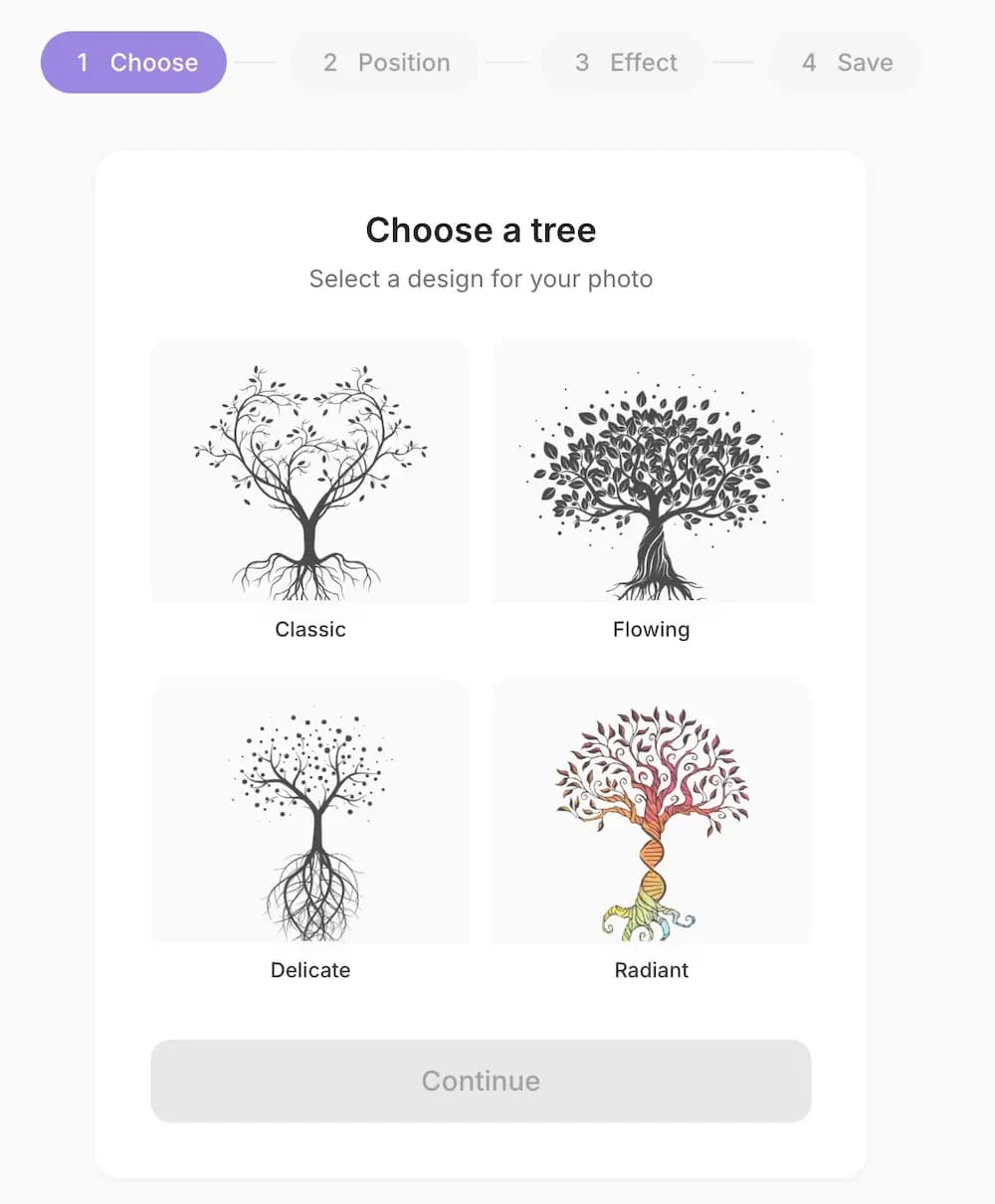
Each tree has its own personality. Take a moment to see which one resonates with you:
- ClassicHeart-shaped with delicate branches — the original Tree of Life look
- FlowingFull, leafy branches with organic curves
- DelicateAiry and wispy, with scattered dots like floating seeds
- RadiantColorful DNA-inspired trunk with vibrant leaves
Just tap on the one you like and hit Continue.
Position Your Tree
Place it exactly where you want it
This is where you make it yours. The tree appears on your photo and you can adjust everything:
- ↔Drag to move the tree where you want it
- ⤢Pinch or scroll to make it bigger or smaller
- ↻Use the dial to rotate for the perfect angle
Goal: Position the roots over your chest/breast area and the branches extending toward or over baby's head. This creates the beautiful "life flowing" symbolism.

Choose Your Effect
This is where the magic happens
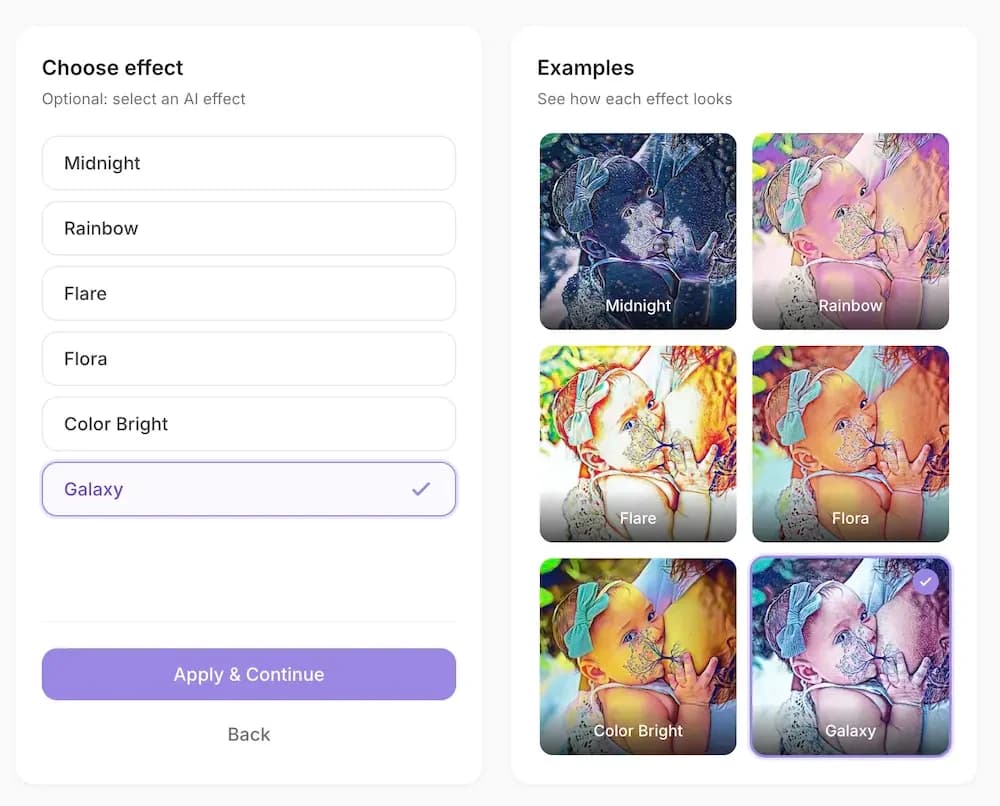
Our AI-powered effects transform your photo into art. You'll see live previews of each one so you can compare before deciding:
- Galaxy — Starry, cosmic, ethereal
- Midnight — Deep blues, moody and elegant
- Flora — Earthy greens, natural warmth
- Rainbow — Joyful colors, celebratory
- Flare — Soft light burst at the connection point
- Color Bright — Bold, vibrant, artistic
Tap any effect to preview it, then hit Apply & Continue when you're happy.
Download Your Creation
Save it, print it, treasure it
You're done! Your Tree of Life photo is ready. Just tap the Download button and it saves straight to your device.
- ✓High-resolution quality — perfect for printing
- ✓No watermarks — it's completely yours
- ✓Ready to share on Instagram, Facebook, or anywhere
Want to try a different effect? Hit Create another to start fresh with the same photo or a new one.

Your Finished Keepsake
Here's an example of what you'll create — a beautiful Tree of Life photo that captures the bond between mother and child.

Total time
Under 60 seconds
From upload to download — we timed it.
FAQ
Frequently asked questions
How many steps does it take to make a Tree of Life photo?
Just five: upload your photo, choose a tree design, position it, pick an effect, and download. Start to finish takes under 60 seconds with no app or account.
What photo file types can I upload?
You can upload JPG, PNG, GIF, and WebP images straight from your phone or computer. There are no size limits to worry about — the editor handles resizing for you.
Which tree designs and effects are available?
There are four tree designs — Classic, Flowing, Delicate, and Radiant — and six effects: Galaxy, Midnight, Flora, Rainbow, Flare, and Color Bright. Each effect shows a live preview before you apply it.
Will my downloaded photo have a watermark?
No. Your finished photo downloads in high resolution with no watermark, ready to print, frame, or share on social media.
Ready to Create Yours?
You've seen how easy it is. Now it's your turn to make something beautiful.
Start Creating NowFree. No app download. No account needed.
Share your creation with #treeoflife #brelfie #normalizebreastfeeding